


About
Goal
To engage students in an online course by offering them choices and testing the instructor’s theory that awarding badges would motivate his students.
Solution
Working with Joe Grimm, I helped design his face-to-face course concept of badges to a completely online format. The course is designed to teach students how to brand themselves as they prepare to leave college and enter the workforce. A former recruiter for the Detroit Free Press, Joe had a lot of great insights to offer his students.
At the time, MSU did not have a badging system available, so I designed a workaround solution for Joe in the university’s LMS. He could easily ‘award’ badges to his students, which I customized for each topic. He then created a final reward, which is to join a LinkedIn group for anyone who has taken the course, in order to stay connected as they move on from the university.
We first outlined all of the badges a student could possibly earn during the course. Students did not have to earn every single badge, as their point values varied. Students could pick and choose whatever combination of tasks they wanted to complete and grades were handled accordingly.
Once the number of badges were determined and requirements to earn them were well defined, I created a custom badge for each task. I then created groups within Desire2Learn, each labeled with the appropriate badge. This is where students would be ‘placed’ once they earned a particular badge.
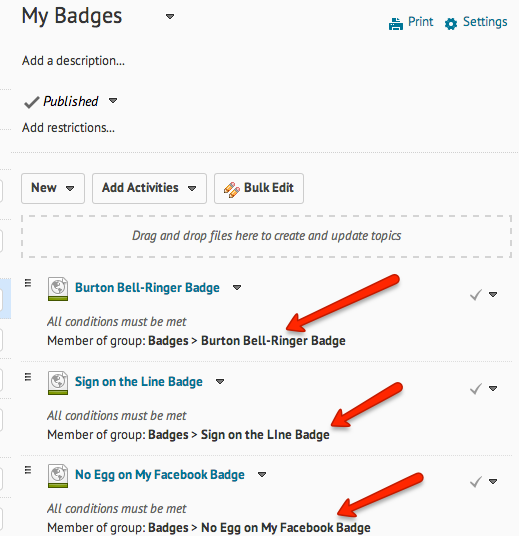
Once all the groups had been created, I created a content module called “My Badges”. This module was visible to each student. Inside the module, I created a page for each badge, noting the award, what it was for, the point value and the customized badge image. This was the key – each of these pages was set to a conditional restriction. In order for a student to see any of the badge pages, they must be a member of that badge’s group.
In other words, as students completed tasks and “earned” their badges, Joe just needed to add their name to the respective badge group and viola! That badge page suddenly appeared to them under “My Badges”. As students earned their badges, their “My Badges” module began to fill up with their accomplishments.
Results
Students in this course actually completed more assignments than they needed to in order to pass the course. Much of the feedback was very positive and students said the reason they did more work than necessary was to earn the badge and ‘see what it looked like’ (they were not shown any badge prior to earning it).
Tools
- Photoshop
- Illustrator
- Desire2Learn Brightspace platform
Roles
Art director, designer, instructional designer